
Reviews
AI does the work. A person signs off.
Put a check after any AI step. The run waits until the right person approves.
Add a review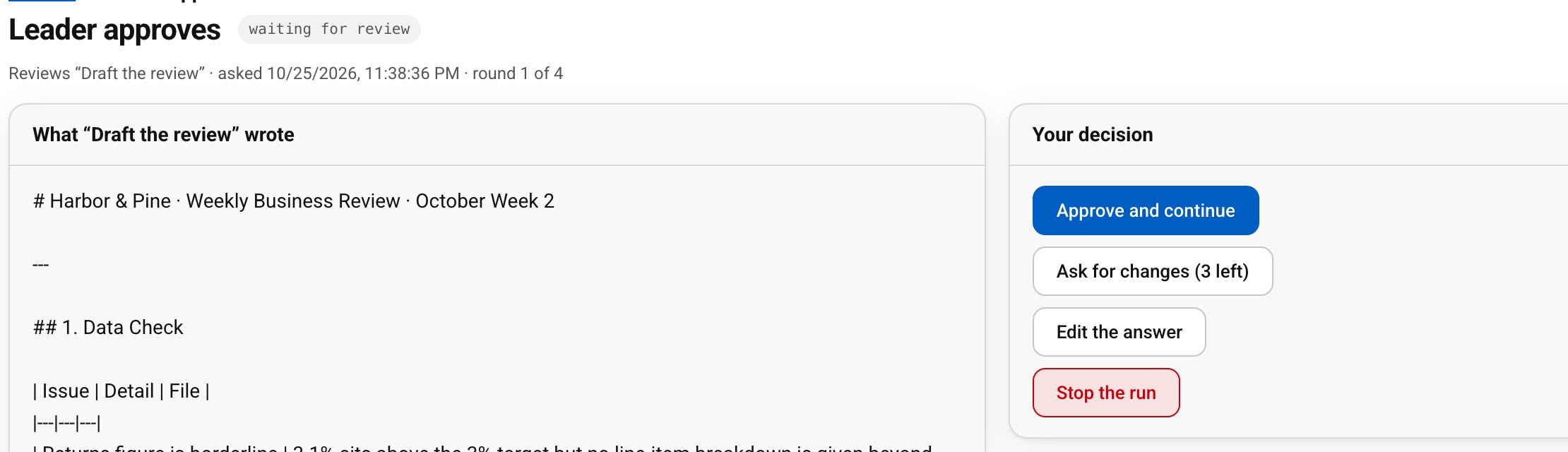
- Since 2017
- Learned by 400,000+ people
- Built by the founder who launched Prime Video’s first version
For your businessUse AI on work that matters, because nothing goes out unchecked.
For youAI does the legwork; you make the call.
What Reviews do for you
The right reviewer
A named person, everyone in a workspace role, or the person who started the run. Nobody else can answer the review.
Clear instructions
Tell the reviewer what to look for. They see it next to the answer.
Four choices
Approve, ask for changes with a note, edit the answer themselves, or stop the run.
A deadline
Choose 1 to 30 days. If nobody answers, the run stops instead of guessing.
Easy to find
Reviewers see waiting work on Home and under Reviews.
How it works
- 1Add a review after an AI step
- 2Choose the reviewer and what to look for
- 3Set the deadline
Questions people ask
What if nobody answers?
The run stops after the deadline you set, instead of going on unchecked.
How many rounds of changes can there be?
You choose, from 1 to 10. Three is the default.